Bella brings Claude into the ABAP editor in Eclipse
An open-source AI assistant for ADT that writes into your editor, reads real definitions through your ADT logon and never touches the SAP system on its own.
I wanted an AI assistant that changes ABAP code where I actually work: in the Eclipse editor of the ABAP Development Tools. I didn’t want a browser tab I copy snippets out of, and I didn’t want a tool that writes into the SAP system behind my back. So I built Bella, an Eclipse plug-in that brings Claude and other models into ADT. It is open source under the MIT licence, and I’d like ABAP developers to try it and tell me what breaks.
What Bella does
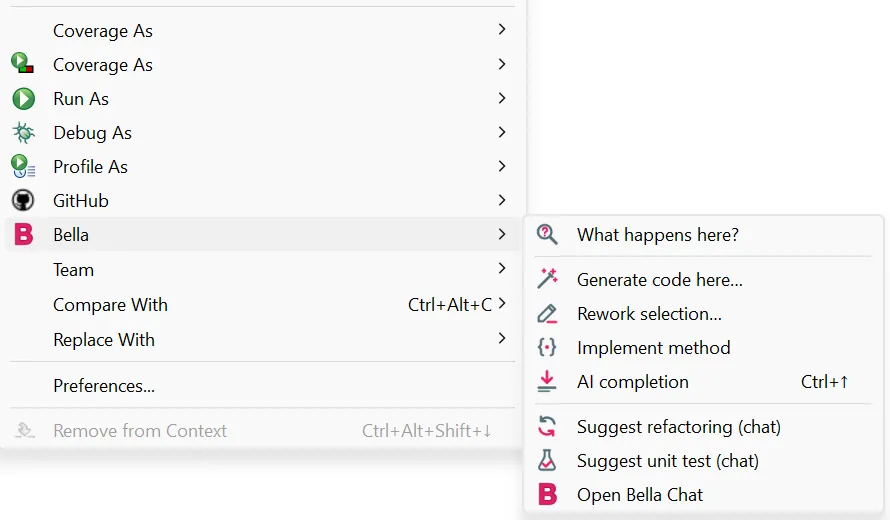
Right-click in the ABAP editor and you get a Bella submenu:
- What happens here? explains the selection or the method at the cursor. It also lists side effects and suspicious points, such as a missing authority check.
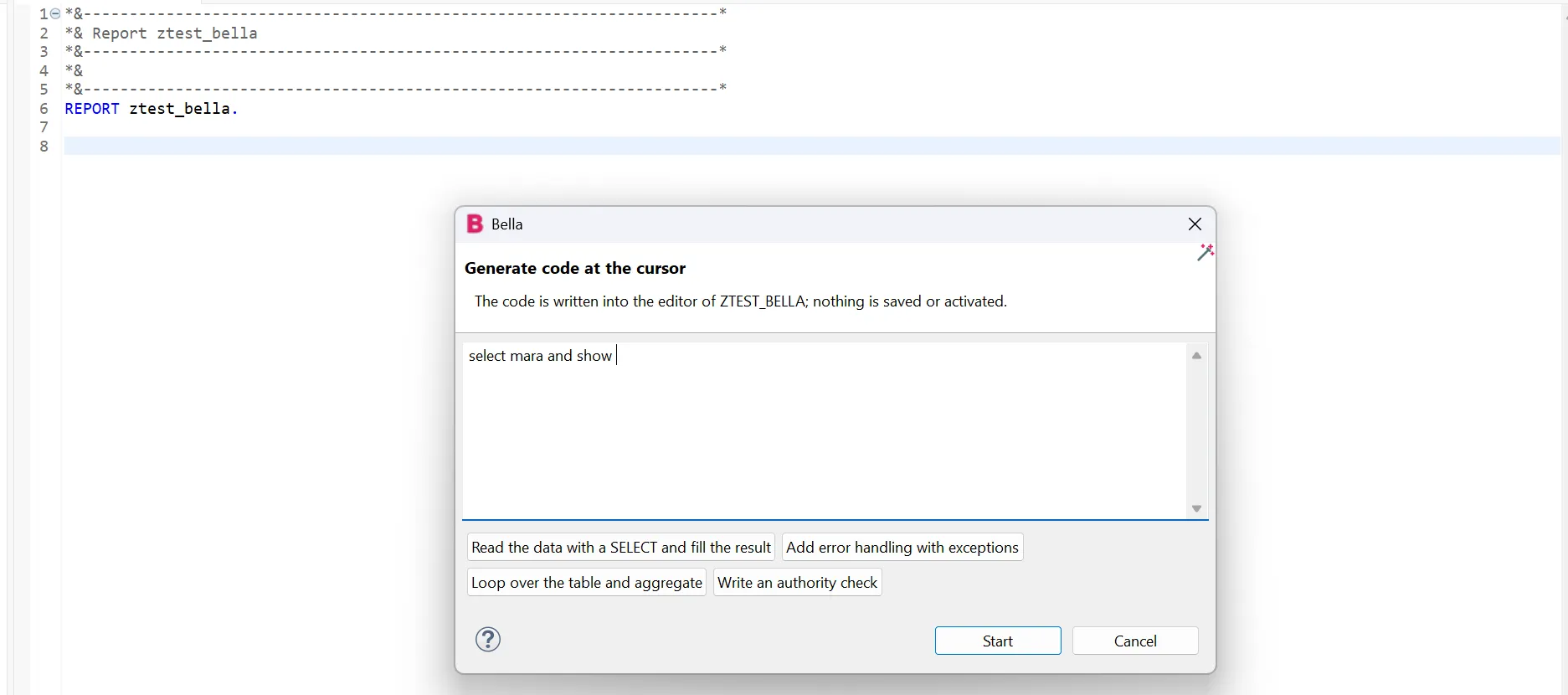
- Generate code here… writes code at the cursor from a short description.
- Rework selection… fixes errors or moves code to modern syntax, ABAP Cloud, better performance or clearer comments.
- Implement method writes the body of the METHOD, FORM or FUNCTION at the cursor.
There is also an inline completion as grey ghost text (Ctrl+↑, Tab accepts) and a chat (Ctrl+Alt+B) that sees the code in your editor and can call SAP tools.
The editor is the only place code changes
This is the design decision everything else follows from. When Bella writes code for an object you have open, it writes into the editor buffer and nowhere else. A diff preview shows old and new side by side first. After that the editor is dirty, but nothing is saved or activated. Ctrl+Z takes it back, and you save and activate with Ctrl+S and Ctrl+F3 as you always do. The editor holds the lock on the object, so this is also the only place a change can safely land.
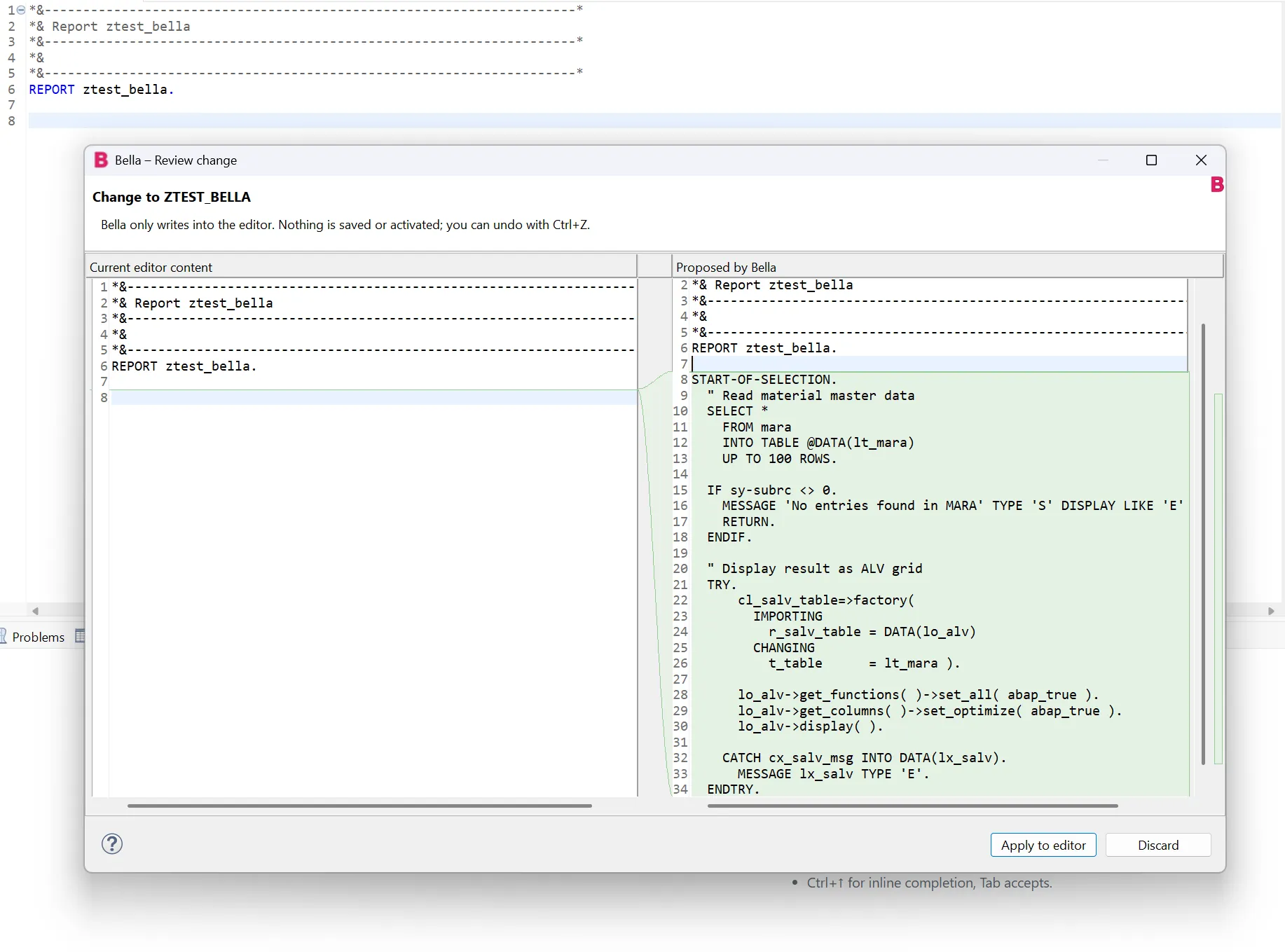
If the model tries to change an open object through a tool in the chat, Bella’s router redirects the write into the editor. Objects that are not open can be written, created and activated in the system, but only after you confirm. The defaults look like this:
| Tool | Default |
|---|---|
| Read and check (search, read source, context, where-used, syntax check, ABAP Unit, ATC, style check) | runs automatically |
| Write, create, activate | asks first |
| Release transports | always refused |
When a chat prompt leads the model to change something in the system, Bella stops before anything reaches SAP. It shows which tool the model wants to call, the object’s name, type and package, and the complete source it would write. Nothing happens until you click Allow. In the example below, the chat was asked for a test report that reads MARA and shows it as an ALV list. The model wants to create Z_KT_TEST123 in $TMP, and you can read every line before you decide. Creating an object does not activate it; that stays a separate step.
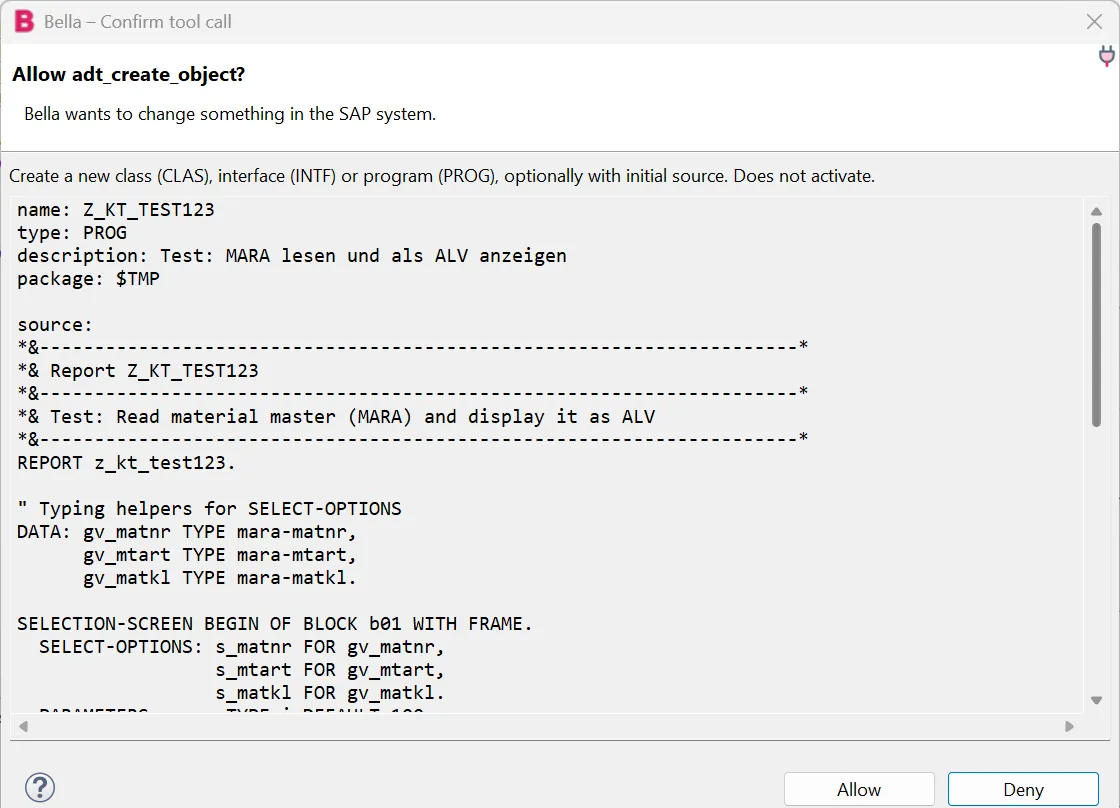
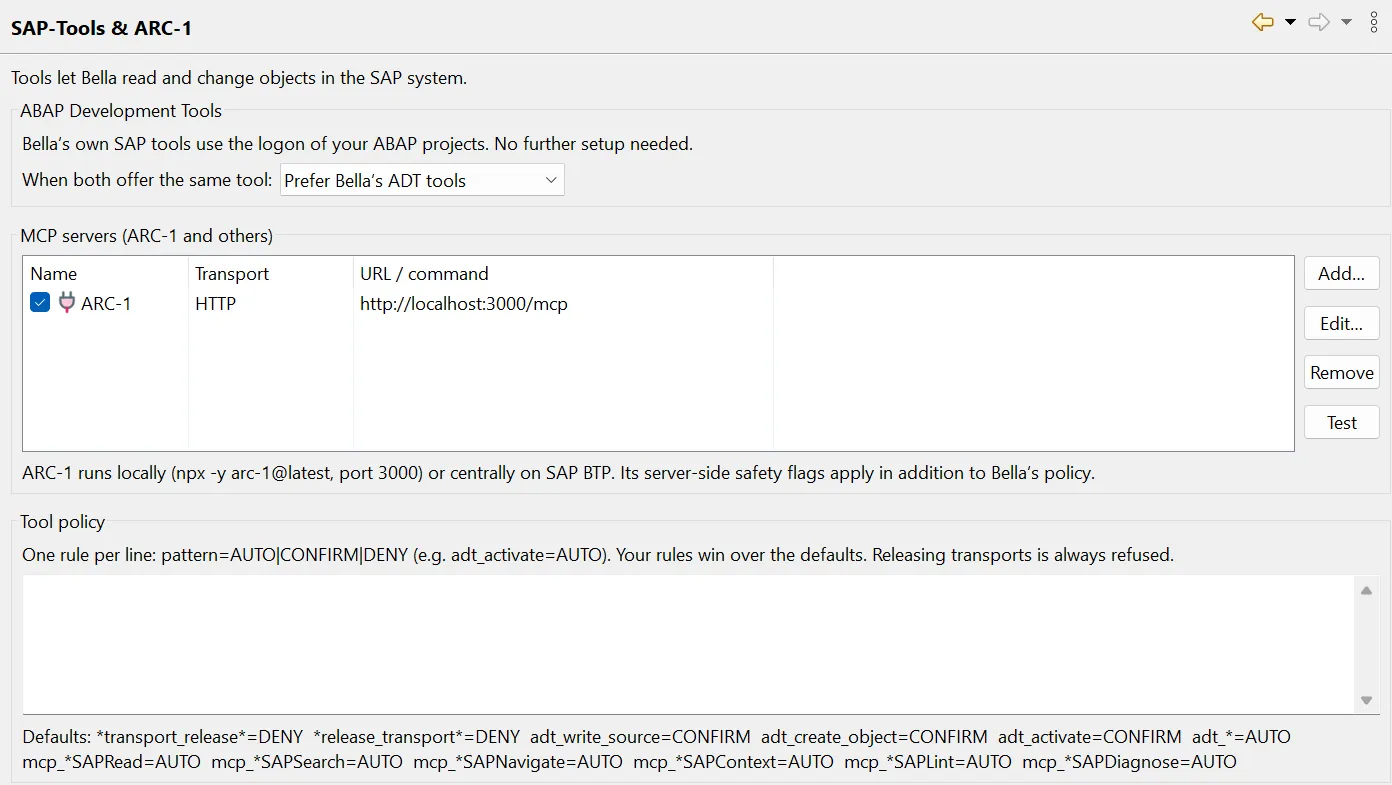
You can add your own rules as pattern=AUTO|CONFIRM|DENY.
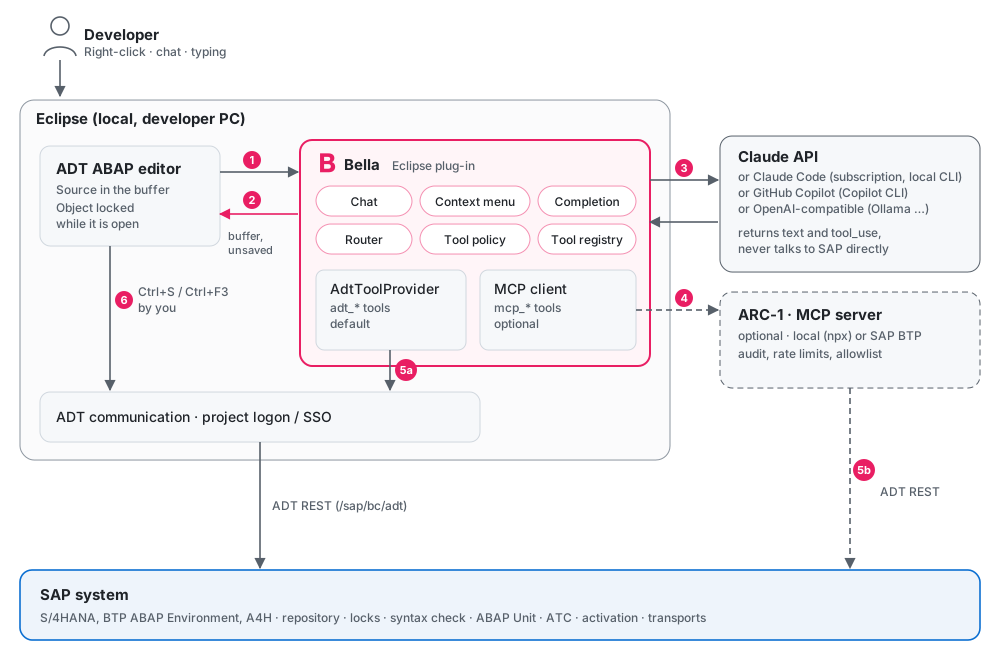
Only Bella talks to the model, and the model never talks to the SAP system. Tool calls come back to Bella, which runs them in Eclipse through the ADT logon you already have. Your system does not need to be reachable from the internet.
Real definitions instead of guessed field names
A model that doesn’t know your system guesses field names and method signatures, and the guesses look plausible enough to waste your time. Before it sends a request, Bella therefore collects the objects the code and your instruction mention: tables in a SELECT, types after TYPE, classes before => or after NEW, function modules in CALL FUNCTION, and names like MARA in “select mara and show”. It loads their definitions from the system, up to 12 objects within 8 seconds, and lists them in the diff preview under SAP definitions used.
In the chat the model does this itself. The adt_context tool takes an object name, a piece of code or a list of names and returns in one call the public section of classes and interfaces, table and structure fields, CDS views, function module signatures, data elements and table types.
Generated code also passes through abap_lint, a small rule set of Bella’s own: obsolete statements, SELECT *, SELECT in loops, unchecked SELECT SINGLE, empty CATCH blocks, break-points. It is not abaplint and no replacement for ATC. Its purpose is to point at the obvious problems in the diff preview before the code reaches your editor.
Quick to roll out, also on Citrix
Bella is an Eclipse plug-in and nothing more: no server to run, no second logon, no extra process. It uses the logon of your ABAP projects, including SSO. That makes it quick to put into place, and it works the same when your Eclipse runs on a Citrix desktop.
You install it from the update site https://bella.kilian-taubmann.de/, or offline from a ZIP on the GitHub releases page. Bella does not ship or download ADT and accepts any installed ADT version, so your existing installation stays as it is. You need Eclipse 2024-12 or newer with Java 21 and ADT.
You choose the model
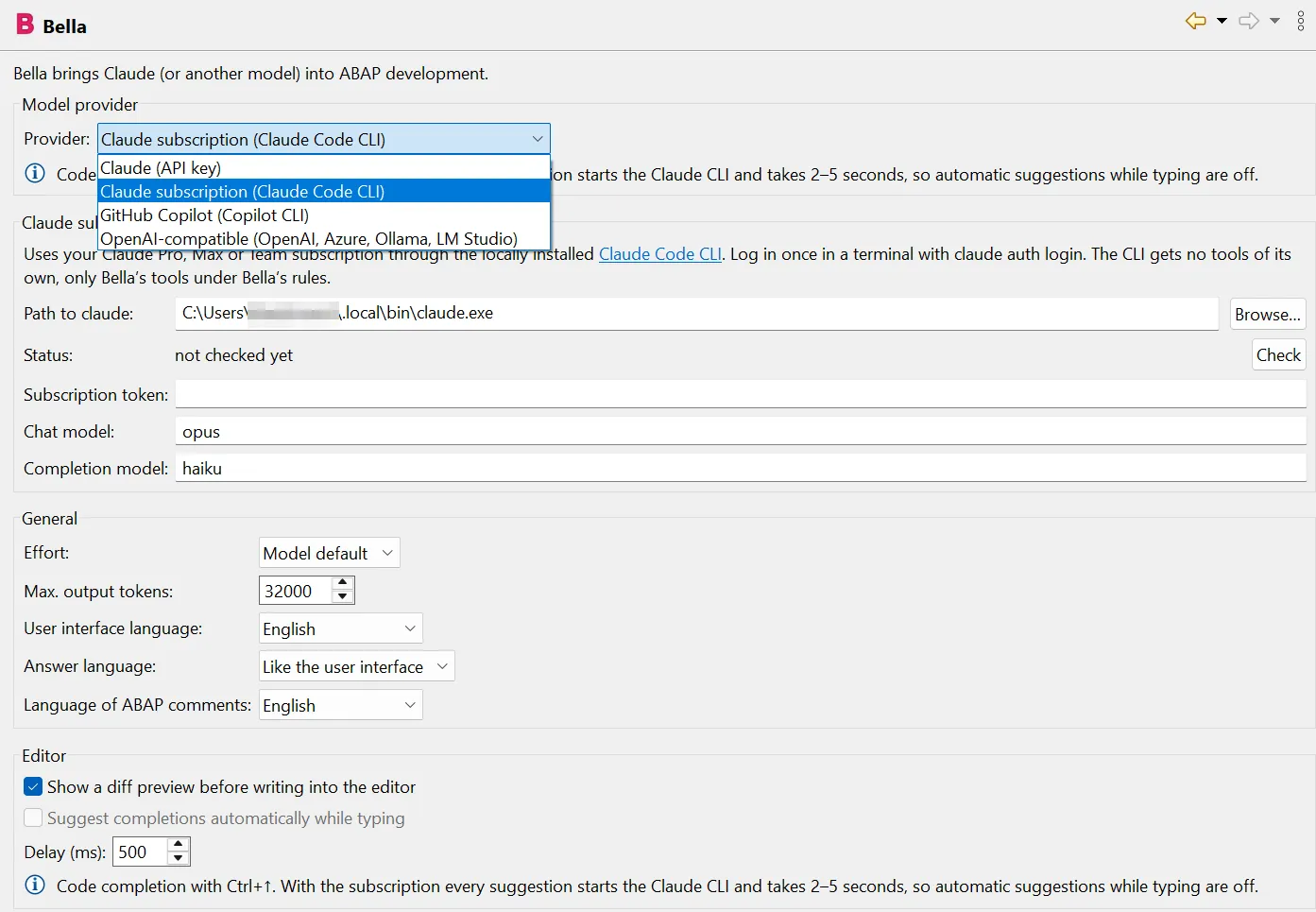
In my view Bella is an open-source alternative to Joule in ADT: you can read every line of it, change it, and pick the model yourself. There are four providers:
- Claude with an API key, stored in Eclipse secure storage
- Claude subscription through the local Claude Code CLI, no API key needed
- GitHub Copilot subscription through the Copilot CLI, with any model your plan offers
- OpenAI-compatible endpoint, for example Ollama, so your source code never leaves the house
With the two CLI providers, the CLI’s own tools are switched off: no shell, no file access, no web access. The CLI reaches the SAP tools only through a local MCP server inside Bella, which listens on 127.0.0.1 and requires a random token. The same tool policy, confirmation dialog and router apply as with an API key. One limit: a completion through a CLI takes a few seconds, so with a subscription there are no automatic suggestions while typing, only on Ctrl+↑.
Bella and ARC-1
ARC-1 is an MCP server for SAP systems, and I see the two as a good pair rather than competitors. Bella’s own ADT tools give the model the same kind of system knowledge ARC-1 provides with SAPRead and SAPContext, directly in Eclipse and without extra setup. ARC-1 adds what a plug-in on a developer’s machine can’t: the real abaplint rule set, a central audit log, rate limits, a package allowlist, and tools that run on a server.
You add ARC-1 under Preferences → Bella → SAP-Tools & ARC-1, over HTTP or as a local process (npx -y arc-1@latest). If both offer the same capability, Bella’s ADT tools win by default. You can prefer ARC-1 instead when governance should run centrally.
Where it stands, and how you can help
Bella is at version 0.4.2. Generating code, explaining it and writing into the editor are in use against a real ABAP system. The SAP tools in the chat (search, where-used, ATC, activation) need broader testing. The ADT endpoints for tables, structures and data elements differ between releases, so I’m especially interested in objects Bella can’t read. The Copilot integration has been tested against a simulated CLI, and a full chat with a real Copilot subscription is still to come. All translations except German and English are machine-generated.
If you write ABAP in Eclipse, please try it and tell me what you find: bugs, objects it can’t read, actions you’re missing, or ideas that would make it more useful in your daily work. Open an issue on GitHub. For bugs, switch on the log file under Preferences → Bella → Log file and attach it. It is off by default and never contains keys or tokens.
- Update site:
https://bella.kilian-taubmann.de/ - Source and releases: github.com/ktaubmann/Bella